






ORIGAMIQuotationFrom project to quote to order
Create quotations straight from each project, send them for approval, and turn them into sales orders as soon as the price is agreed.

HOW A QUOTE BECOMES AN ORDER
- 1Create from project
- 2Approve
- 3Confirm price
- 4Sales order
QUOTATION
Part of Origami Customer & Sales
Every proposal, one continuous sales flow.
Origami Quotation lets sales teams create and manage quotations directly from each project, with the project's data already filled in.
Once the price is agreed, a quotation becomes a sales order in one step, so the process from proposal to confirmed order stays quick and organised.
KEY FEATURES
Quotes the whole team can track
01
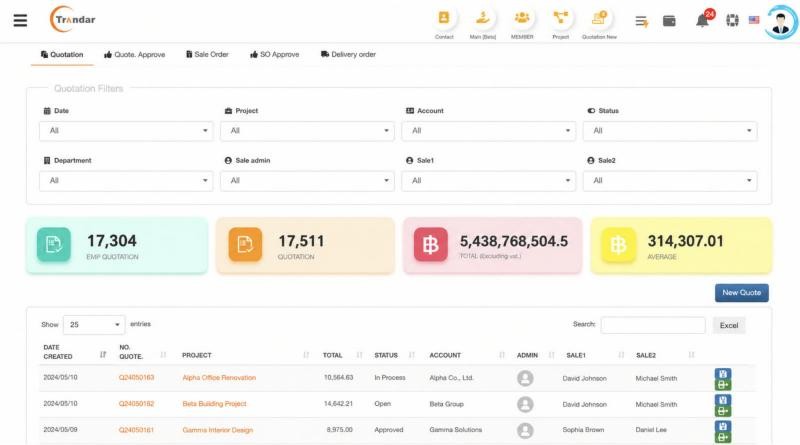
Every quotation, with its numbers
See quotations by date, project, account, status and salesperson, with totals and averages at the top.
- Quotation, approval, sales order and delivery order tabs
- Totals excluding VAT
ALSO INCLUDED
Less typing, faster orders
COLLABORATION & INTEGRATION
From quotation to order, connected
Quotes stay linked to the project and the customer they belong to.
Ready to fold your business into one system?
Turn every proposal into a smooth path to a confirmed order.