






ORIGAMIBudgetingPlan budgets, control every expense
Set annual budgets by department or division, compare them with actual spending, and see what is left before anyone overspends.

HOW A BUDGET IS MANAGED
- 1Plan budget
- 2Track expenses
- 3Analyse variance
- 4Control costs
BUDGETING
Part of Origami Work & Operations
Every department knows its budget, and every manager sees the whole picture.
Origami Budgeting lets executives set annual budgets by department or division, track allocated budget against actual spending, and monitor remaining balances.
Budget management becomes transparent and traceable, reducing the risk of overruns and supporting better cost control.
KEY FEATURES
See budget, spending and balance together
01
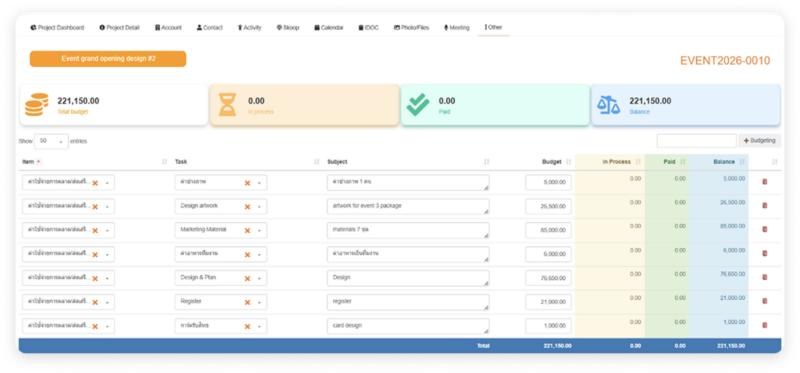
Budget, in process, paid and balance
Each budget line shows its item, task and subject, with the amount budgeted, in process, paid and remaining.
- Totals at the top of every budget
- Add budget lines as plans change
ALSO INCLUDED
Spend with confidence
COLLABORATION & INTEGRATION
Budgets connected to the work that spends them
Budget lines follow the projects and requests that use them.
Ready to fold your business into one system?
Plan budgets accurately, track spending clearly, and control costs.