




ORIGAMITimePunctual time, seamless workflow

Set daily, monthly or yearly shifts and let staff stamp in and out on the web or the mobile app, from the office, a client site or home.

Origami paper clock, the Origami Time symbol

HOW TIME FLOWS

  1. 1Set shifts
  2. 2Stamp in / out
  3. 3Location check
  4. 4Leave & OT
  5. 5Payroll
Connected dataLess manual checkingMore accurate payroll

ON WEB AND MOBILE

Clock in from anywhere your team works

Available on the App Store and Play Store. Employees and HR see the same data.

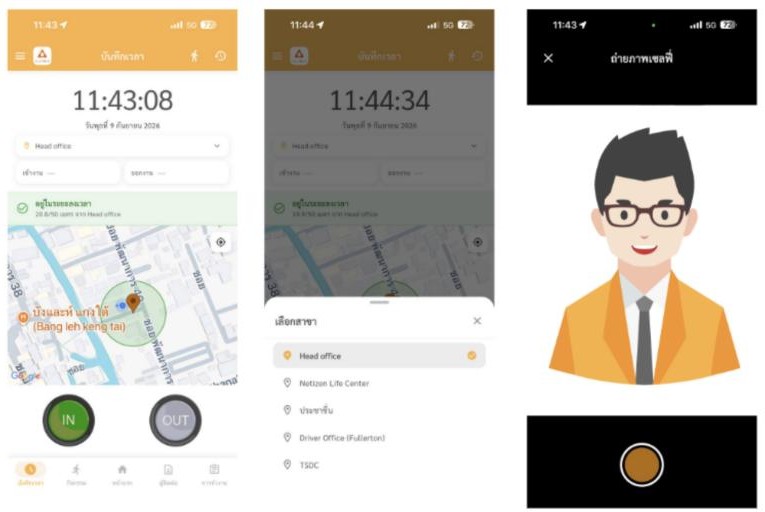
Origami Time app showing stamp in and out with location, branch selection and selfie check

Stamp in and out on the app

Pick the branch, check the location and take a selfie, then tap IN or OUT.
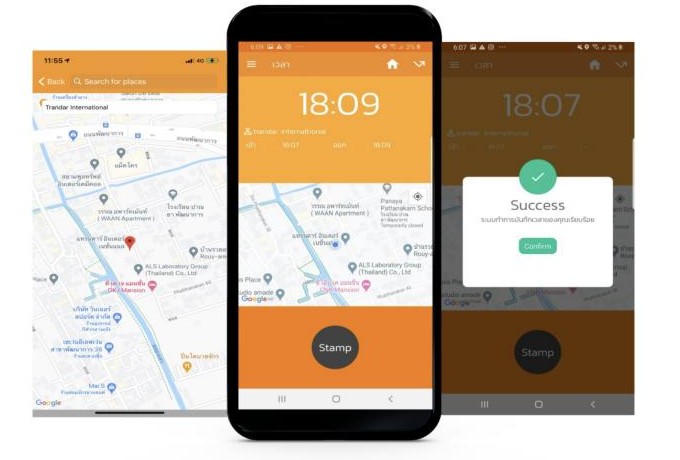
Stamp screen on a phone with a map and a success message

Location checked against policy

Office, client visit or work from home: the location is recorded according to company policy.
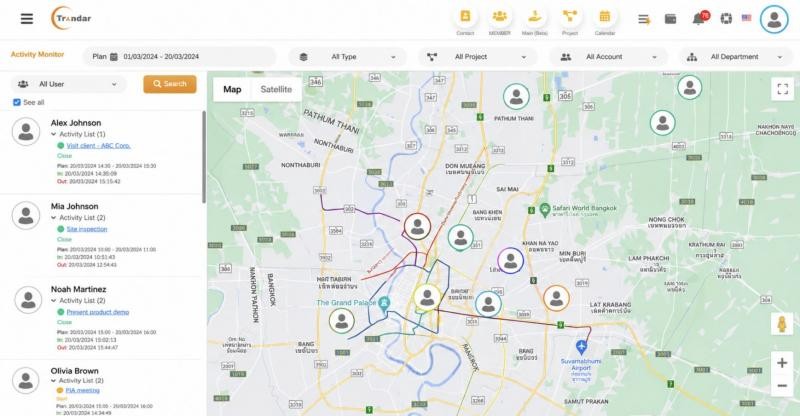
Activity monitor map showing where each employee checked in

See the team on a map

Supervisors see where and when each person checked in, with their activity list.

ALSO INCLUDED

Built for every way of working

Flexible shifts

Daily, monthly or yearly shifts, including overlapping shifts for shift-based teams.

Leave, holidays and OT

Set leave types, annual holidays and overtime rules to match your policy.

LINE and Telegram alerts

Attendance notifications reach employees and supervisors where they already chat.

Reports in PDF or Excel

Summaries of work hours, leave and overtime, exported in one click.

← Back to People & HR

Ready to fold your business into one system?

Make time tracking simple and accurate, and connected straight to payroll.