






ORIGAMIWorkOne click, straight to the approver
Employees check their leave balance, request leave and record overtime on the web or app. Approvers are notified at every step, and approved data flows into payroll.

HOW A REQUEST FLOWS
- 1Check quota
- 2Request leave / record OT
- 3Approve
- 4Payroll
WHY MOVE LEAVE ONLINE
Leave and overtime, without the chasing
Most leave problems are not about policy. They come from requests and balances living in different places.
LEAVE ON PAPER AND CHAT
- Employees ask HR how many days they have left
- Requests sent on paper, email or LINE
- Approvals get lost in chat threads
- Nobody is sure who is off next week
- HR re-types approved leave and OT into payroll
WITH ORIGAMI WORK
- Remaining leave by type, always visible
- Requests and OT on the web or app, anytime
- Set approval steps with automatic alerts
- A colour-coded team leave calendar
- Approved data flows straight into payroll
KEY FEATURES
Everything a leave request needs, in one place
01
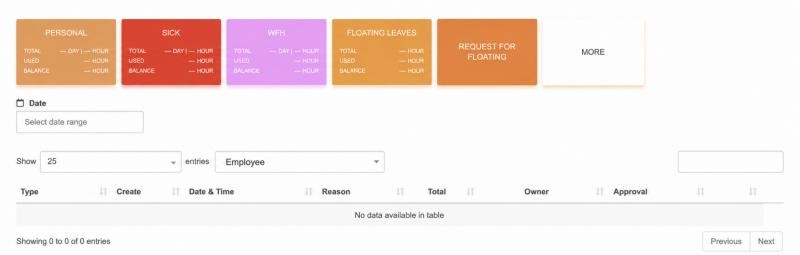
Check your own leave balance
Employees see their remaining days for each leave type without asking HR, so planning time off is easy.
- Personal, sick, WFH and floating leave
- Used and remaining at a glance
02
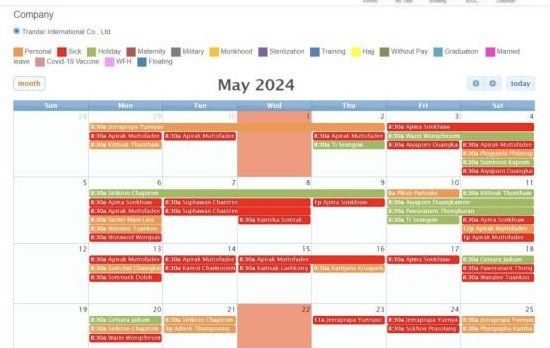
See who is away on one calendar
A calendar colour-coded by leave type shows the whole team's time off, so managers can plan cover.
- Colour per leave type
- Monthly team view
03
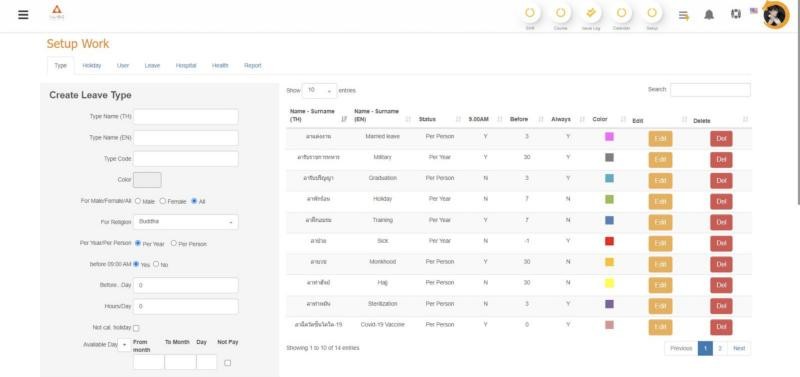
Set leave rules to fit your policy
HR sets up leave types, holidays and overtime conditions, with approval steps that follow the chain of command.
- Leave types, quotas and colours
- Holidays and OT conditions
- Approval steps with notifications
COLLABORATION & INTEGRATION
Leave and OT data, connected across HR
Approved requests are passed on automatically, with no re-entry.
Ready to fold your business into one system?
Simplify leave and overtime in one system, ready for payroll.