






ORIGAMISkoopYour company news feed
Post news, announcements and updates with files and images, share them with the right people, and keep everyone informed in one place.

HOW NEWS TRAVELS
- 1Share
- 2Communicate
- 3Connect
One place for updatesEasy to shareReaches the right people
WHY AN INTERNAL FEED
Company news people actually see
When updates are spread across chat groups and email, people miss them and nobody can find them later.
CHAT GROUPS AND EMAIL
- Announcements lost in busy chat groups
- Files shared in one chat, needed in another
- Everyone gets every message, relevant or not
- Hard to find last month's update
WITH ORIGAMI SKOOP
- One feed for news, announcements and activities
- Files and images attached to the post
- Choose which teams or groups see each post
- Trends and latest posts, easy to look back on
KEY FEATURES
Post once, reach the right people
01
An internal social feed
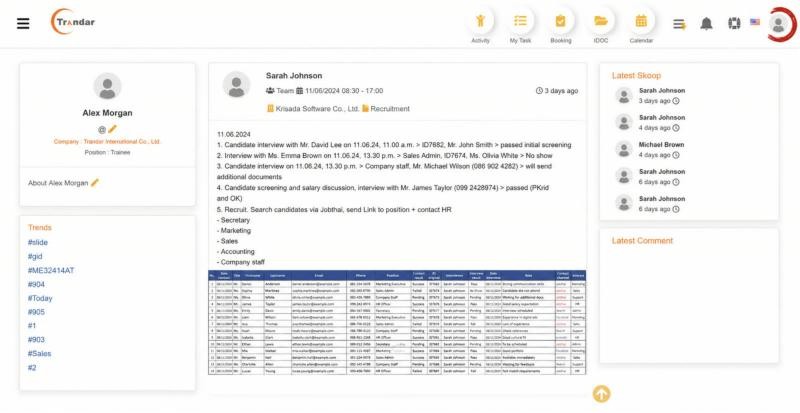
Employees follow company news, team updates and activities in one feed, with trending tags and the latest posts at a glance.
- Hashtags and trends
- Latest posts and comments
02
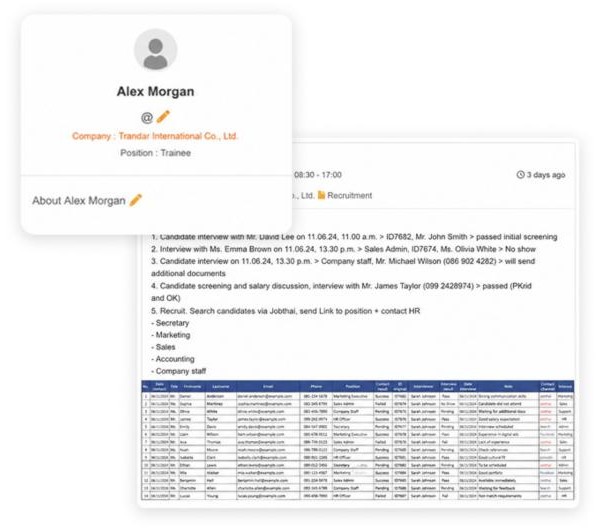
Posts with files and images
Share detailed updates with attached documents, tables and images, and set who can see each post.
- Documents and images
- Access by team or department
COLLABORATION & INTEGRATION
Internal communication, connected
Skoop keeps news close to the people and the work it is about.
← Back to Customer & Sales
Ready to fold your business into one system?
Keep everyone informed, with company news in one place.